
In Ghana, Melbet is one of the largest sportsbooks & online casinos operating today. It offers dozens of services, from 30+ sports and 5,000+ casino games to regular prize draws, virtual sports, and lotteries. To access all these features, newcomers should create an account first.
The Melbet registration procedure is simple and completely free of charge. All you need is your basic personal details and a few minutes of time. Follow the guide below to join Melbet Ghana today.
Available Melbet Registration Methods
Users can register at Melbet Ghana in several ways: with one click, by phone, by email, or via social media. All of these methods work on desktop, on the mobile site, and in the app.
One-Click
This is the fastest option to complete the Melbet sign-up. You simply need to specify your currency and country, and the system will generate the rest. Once done, you’ll see the ID and password on the screen. Save them for future logins.
By Phone
Melbet registration by phone requires an active Ghanaian number. To complete it, enter your phone number and then confirm it with a code sent via SMS, Telegram, or a phone call.
By Email
Registration by email is a bit longer than the other methods, since it requires the most personal data. In addition to the email address, it’s necessary to choose your country and currency, enter a phone number, and create a password.
Via Social Networks
The method is good for users who already have an open account on a certain social network and want to register quickly. Today, Melbet supports registration via Google, Telegram, X, and MetaMask.
Just choose the network you prefer and allow access to the basic profile information. Then your Melbet account will be linked to that social media profile automatically.
Melbet registration process
Even beginners complete Melbet registration in a couple of minutes. Follow these steps to create a new profile:
- Open the Melbet site and hit “Registration” in the header.
- Select the sign-up method from the list.
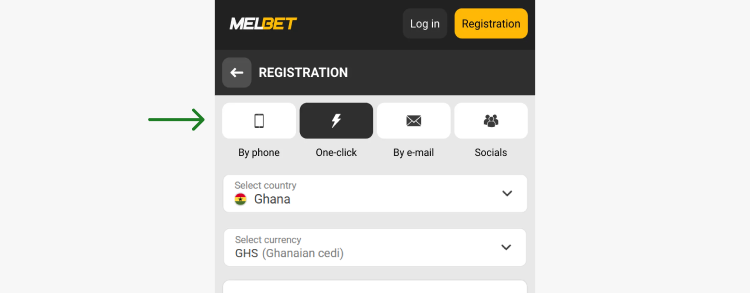
- Click on the preferred Welcome bonus or reject bonuses.
- Fill in the empty fields with your info: contact details, currency, country, etc.
- Enter a promo code BOOKIE130 to activate an increased Welcome offer.
- Tap “Register” at the bottom.
Now you’re registered at Melbet GH and can use all its services freely. The first login will be done automatically.
Registration via Melbet app
Melbet registration is also available in the mobile app for Android & iOS. The procedure is just as simple and fast, with only minor differences.
Here’s how to register on Melbet via the mobile application:
- Launch the app on your mobile device.
- Click on the yellow “Registration” button.
- Choose the Melbet registrationmethod.
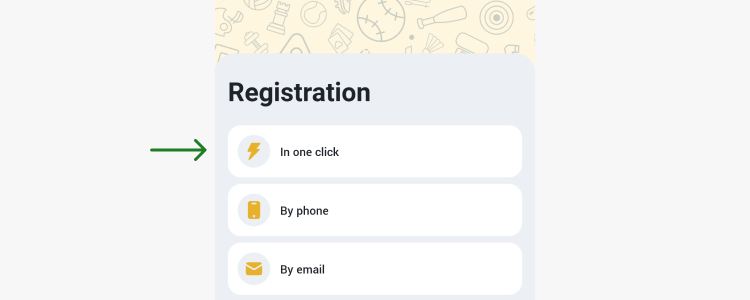
- Enter the necessary details in the specified fields.
- Use a promo code BOOKIE130.
- Tick the box to confirm you’re 18 years or older and agree to the app’s rules.
- Hit “Register” and log in.
In a few seconds, you’ll access your Melbet account with all the functions: deposits & withdrawals, bonuses, online casino games, sports, customer support, etc.
Registration requirements
Before starting the Melbet registration, make sure you meet the basic requirements and have the necessary information ready. This will save time and prevent rejections later.
These are the key moments to consider:
- Legal age. Underage gambling is prohibited in Ghana, so you must be at least 18 years old to register;
- One account per person. Duplicate accounts lead to permanent blockage in the future;
- Accurate personal details. Provide only real info that matches your official ID, including your full name, date of birth, and place of residence;
- Local phone number. To confirm Melbet registration, you need an active Ghanaian mobile number that you can access right now. The bookie will send a confirmation code to it via SMS, Telegram or a phone call.
If you fail to meet any of these conditions, registration may be rejected or your Melbet account may have limited functions later on.
Melbet account verification
Verification at Melbet Ghana isn’t mandatory at the very beginning. However, newcomers must complete it for full use of the platform’s services. For example, it’s impossible to withdraw funds if the account isn’t verified. It’s also needed to recover access to the profile in case some registration details are lost. Plus, verified users can resolve any disputes with the support team much faster, since their identity is already confirmed.
To pass verification, you need to fill in the profile and confirm your email and phone number. Sometimes, the security team requests additional documents to confirm your identity. Just upload a photo/scan of a valid ID document (passport, ID card, or driver’s license), proof of address (utility bills), and proof of the payment method you’re using for deposits & withdrawals (bank statements). Melbet will review and approve your application within 24-72 hours.
Melbet Welcome Bonus

New users at Melbet Ghana claim a welcome bonus on their first deposit from 7 GHS. The general offer is 200% up to 3,100 GHS. Use a promo code BOOKIE130 during registration, and the bonus will turn into 200% up to 4,650 GHS.
The bonus can be withdrawn after meeting the wagering requirements. You need to place its amount 8 times in accumulator bets. Each accumulator must contain 3 or more events, with at least 3 of them at odds of 2.10 and higher.
How to deposit on Melbet
Only with funds on the balance can you place real bets, activate bonuses, and use the platform’s full functionality without restrictions. To make a deposit at Melbet after registration, follow these steps:
- Click on the dollar icon (website) or the “+” sign (mobile app) in the header.
- Choose your payment method from the list.
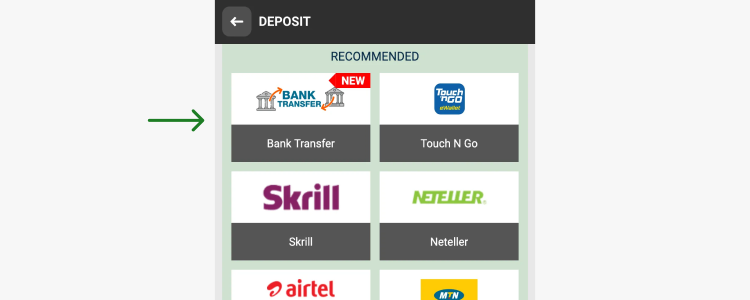
- Specify the amount and other necessary details like your wallet number, email, phone number, etc.
- Hit “Confirm” at the bottom.
- Confirm the deposit via your payment provider.
Your deposit will be credited within a few seconds. Refresh the page to see the updated balance.
Melbet Ghana accepts deposits in GHS and provides a wide range of payment methods. There are over 10 options to choose from, including popular e-wallets, MTN, Airtel, Visa, MasterCard, GG Bank, and cryptocurrencies.
| Deposit Methods | Deposit Limits, GHS | Deposit Time |
| MTN | 10-10,000 | Instant |
| Airtel | 10-25,000 | Instant |
| Telecel | 10-10,000 | Instant |
| MiFinity Wallet | 132-33,012 | Instant |
| GG Bank | 10-7,000 | Instant |
| Neteller | From 66 | Instant |
| Bitget Wallet | 11-115,152 | Instant |
| MoneyGo | 11-575,762 | Instant |
How to log in to Melbet account
Right after registration, you enter your Melbet account automatically. Later, though, you’ll need to sign in manually. The process remains easy and only requires your login and password. Do the following:
- Go to the official Melbet website or open the app.
- Tap on the “Login” button in the header of the page.
- Provide your email/ID/phone number and password.
- Hit “Log In” again.
If you’ve lost your password, click “Forgot Your Password?” right in the login form. The system will help you reset the old password, create a new one, and restore access to your profile.
Melbet registration problems
Issues during registration at Melbet are rare, but they do occur. For these cases, the 24/7 support team is always ready to help you via live chat, by email, by phone, and via popular social networks.
You can also solve certain sign-up problems on your own, without contacting a support agent. Below are the most common issues and their quick solutions.
Phone number not accepted
Check the phone number format, select the correct Ghanaian code (+233), and enter the number without extra symbols, spaces, or dashes. Also make sure the number hasn’t already been used for another account: Melbet prohibits duplicate registrations.
Verification SMS not received
Wait a couple of minutes, then request the code again. If it still doesn’t arrive, check your Internet stability, make sure your phone has a signal, and confirm that you haven’t blocked messages from unknown senders.
Promo code not working
A promo code must appear exactly as it was issued, so check the spelling. If necessary, enter it manually without spaces instead of pasting it, because hidden characters sometimes sneak in when copying.
Unable to complete KYC
Upload clear photos of your documents, check that they meet the requirements (valid, uncropped, readable) and make sure the data matches the information you gave during registration. If a photo is rejected, retake it in good light or make a scan instead.
FAQ
Does Melbet allow registration with multiple Ghana phone numbers under one user?
The system allows only one phone number per account. Plus, each user can hold only one profile. Duplicates are prohibited and lead to permanent blocking.
What happens if I enter incorrect personal details during the registration process?
Incorrect information may lead to rejection during further verification and blocked payments. Always enter accurate data that matches your ID and double-check it before submitting.
Is it possible to change my registered phone number after creating my Melbet account?
Yes, but only through customer support and after identity confirmation.
Is it possible to create a Melbet account in Ghana if my SIM card is registered to another person?
Technically, yes. But it may cause issues with identity confirmation, because your name and phone ownership should match. It’s better to use your own number during registration.
Can Ghanaians register on Melbet using a desktop but verify later on mobile?
Yes. The platform works the same way across both desktop and mobile devices. You can register on a desktop and complete verification later on your phone/tablet, in the mobile browser or in the app.